gx-core — user manual¶
gx-core is the complete BitTorrent client inside gx-torrent: the same
application Gextto uses as its engine, but without Gextto. It opens in the
browser, is configured in a few minutes and already does everything a client
needs: torrents, queue, categories, tags, RSS, Series & movies, archive,
search, statistics, streaming, DLNA and a qBittorrent-compatible API.
[!TIP] This manual is illustrated with a real Docker environment: four legal torrents (Big Buck Bunny, Sintel, Tears of Steel, Cosmos Laundromat), categories, tags, one followed title and transfers in progress. The images come from the real interface, not from mockups.
1. Start in three minutes¶
gx-torrent ships as a standalone archive (gx-torrent-linux-<arch>.tar.gz on
the releases page): it holds the binary, run.sh to start it and
install-service.sh to install it as a systemd service.
tar xzf gx-torrent-linux-x86_64.tar.gz
cd gx-torrent
./run.sh                              # direct start, data in a folder beside it
./run.sh 2                            # or: systemd service, data in /var/lib/gx-torrent
# or: sudo ./install-service.sh       # the same, without going through run.sh
./run.sh --help lists the two choices; with no argument, in a terminal, the
script asks which one you want.
Open http://YOUR-SERVER:8890/: the first visit shows the wizard.
With Docker¶
There is no published image: the container is built from the sources, so
download the repository (or the source archive of a release) first and run the
commands from the folder that holds the Dockerfile. The Dockerfile alone is
not enough, because the build compiles the daemon from the checkout.
git clone https://github.com/buzzqw/gextto.git
cd gextto
docker build -t gx-torrent .
docker run -d --name gx-torrent \
  -p 8080:8080 -p 6881:6881 -p 6881:6881/udp \
  -v gx-torrent-data:/data \
  gx-torrent
With the container the page answers on http://YOUR-SERVER:8080/.
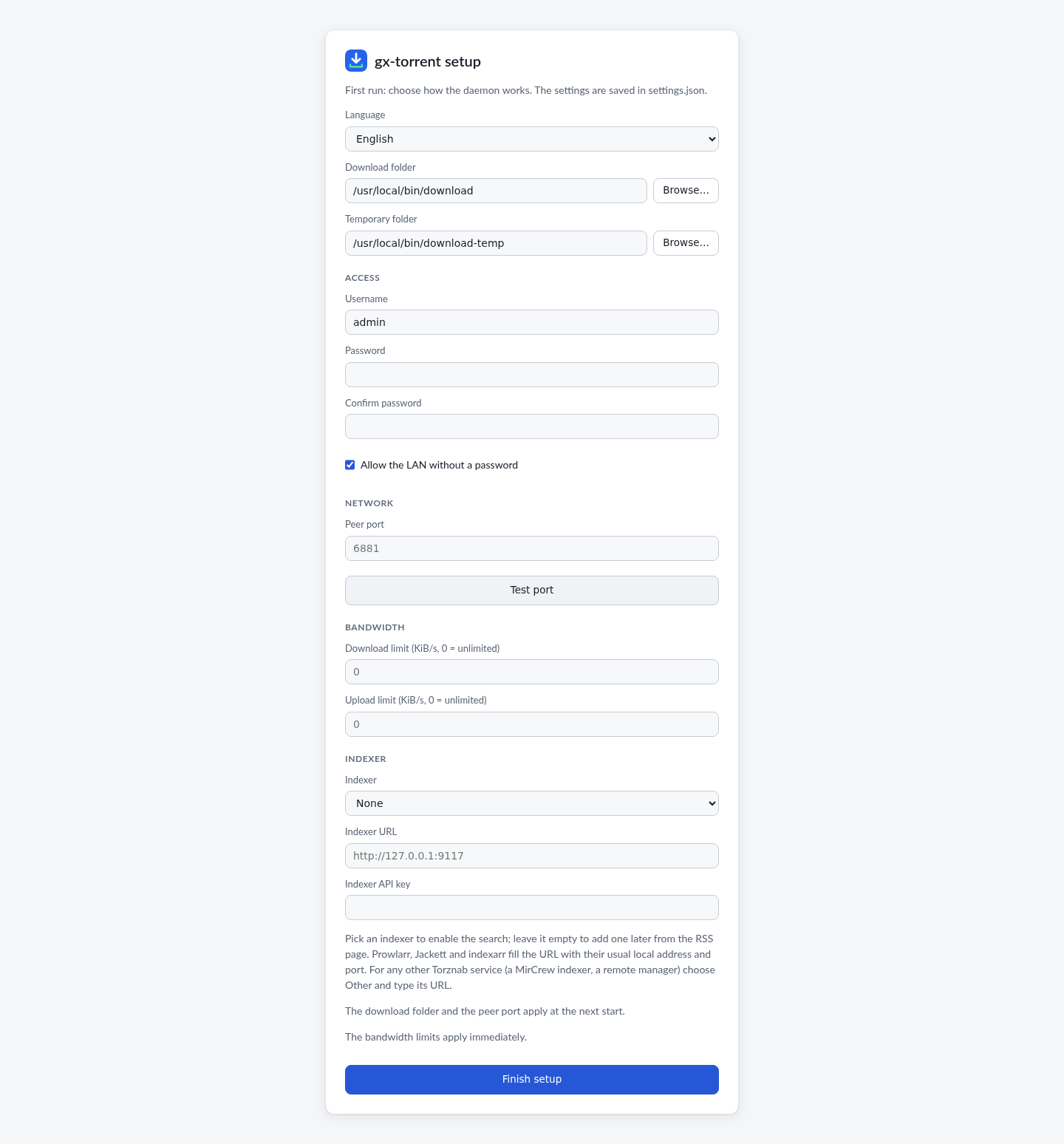
Choose the language, the download folder, the peer port and, if you want, a password. The same wizard can add a Torznab indexer (Prowlarr, Jackett, indexarr or another endpoint). Everything else already has sensible defaults.
2. The Torrents page¶
The main screen is a dense but readable list: state, size, progress, seeds and peers, speed, ETA, ratio, category and tags. The top bar shows the traffic; the status bar has the global controls.
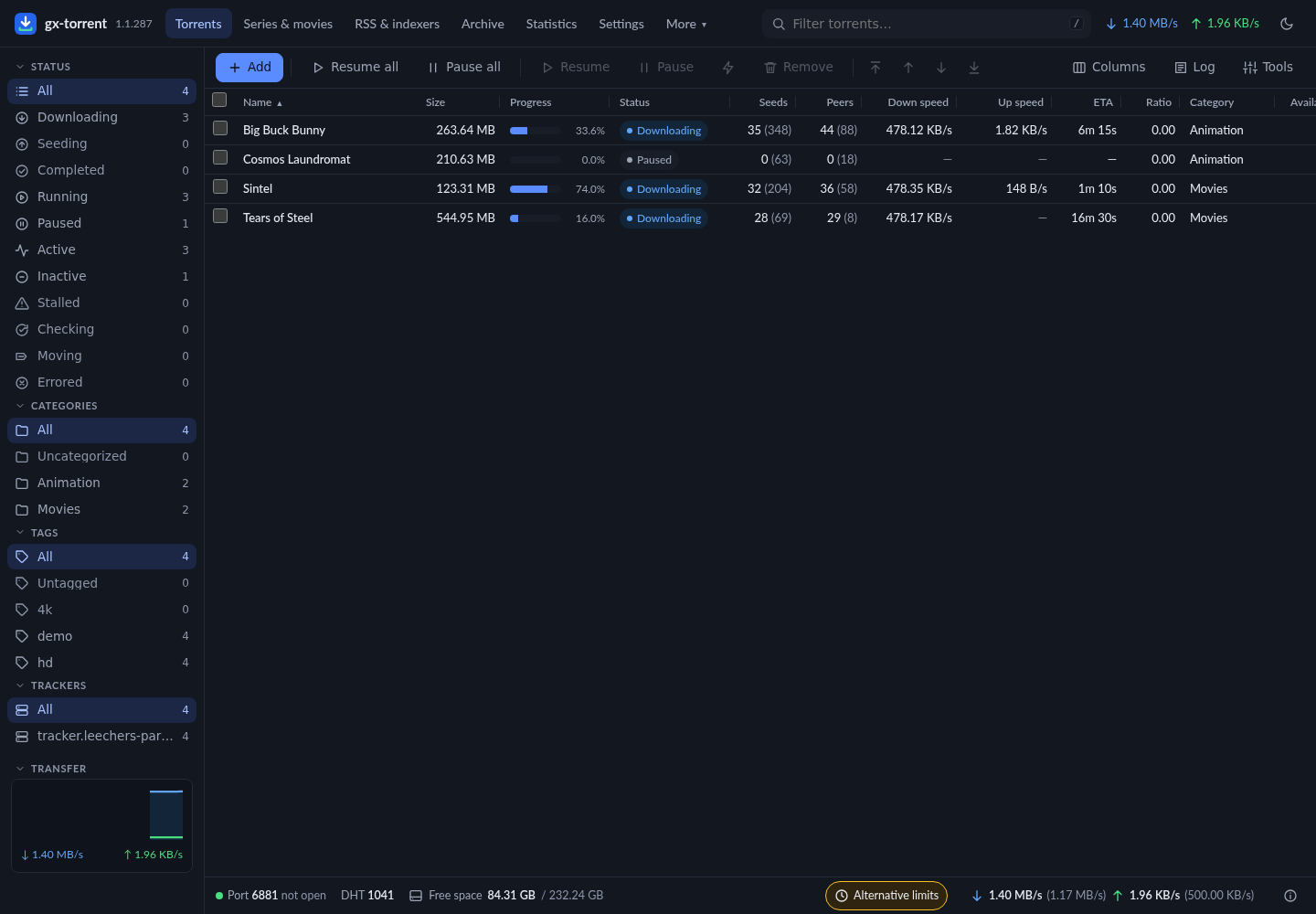
- Add opens magnets,
.torrentURLs and files, with destination, category, tags, pause, sequential, first/last piece, limits and content layout. - Pause all / Resume all stop or restart the whole session.
- Columns can be chosen and resized; the choice is remembered.
- The sidebar filters by state, category, tag and tracker. At the bottom of the sidebar is the interface language (English, Italiano, Deutsch, Français, Español, Polski): you change it from there, the page reloads already translated and the choice stays saved like the field in the settings.
- The context menu has queue, limits, move, rename, verify, reannounce, super-seeding and remove.
Torrent details¶
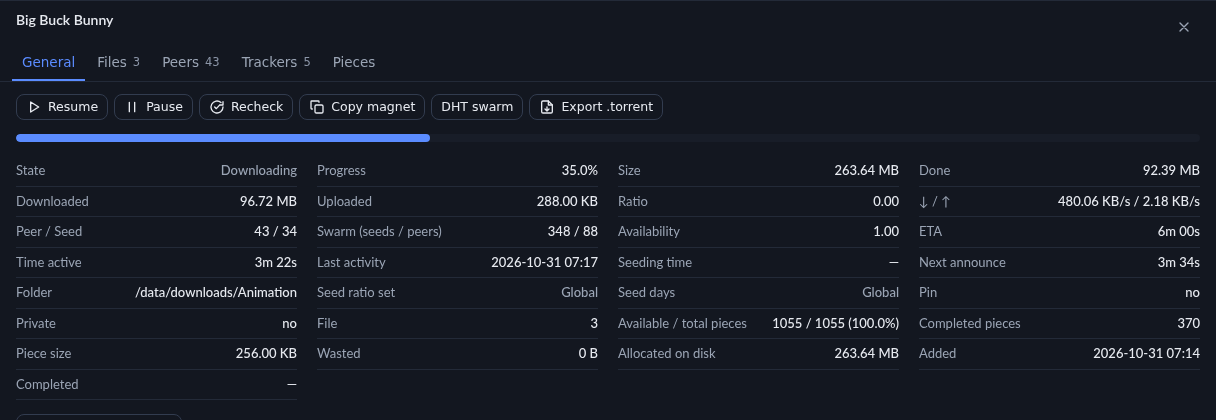
Click a name to open the panel below. General brings together state, pieces, space, dates, limits, seeding and web seeds.
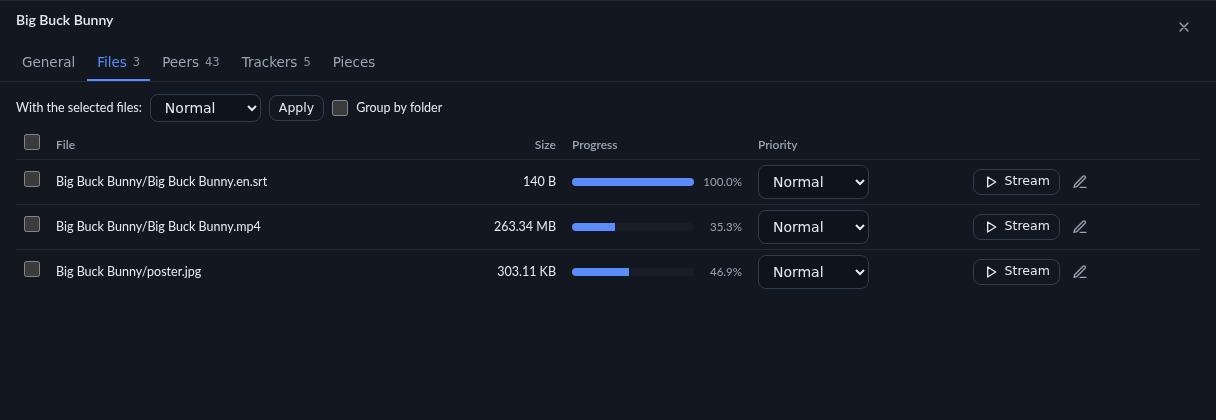
Files shows per-file progress, priority (Skip, Normal, High, Maximum), grouping by folder, rename and HTTP streaming.
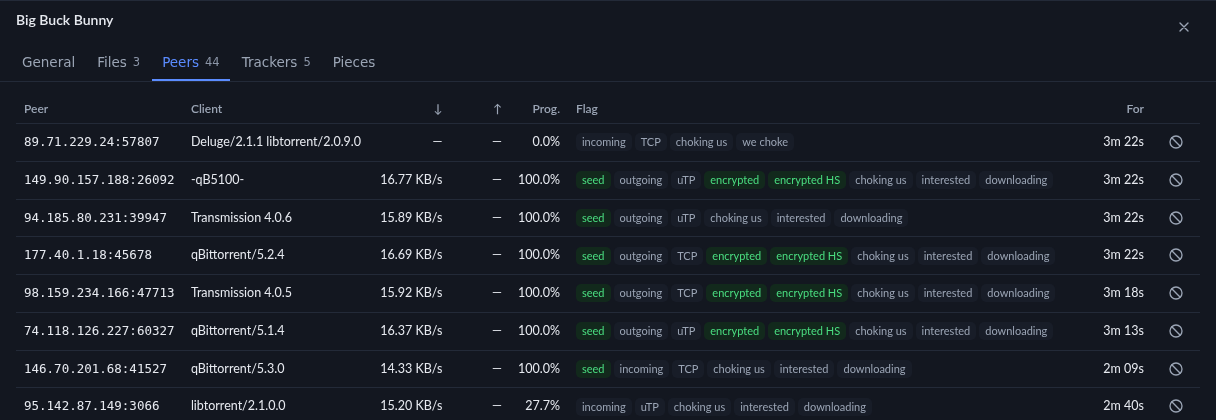
Peers shows client, transport, encryption and flags; from here you add peers and ban an address. Trackers shows status, swarm and next announce; Pieces is the coloured piece map.
3. Add and create¶
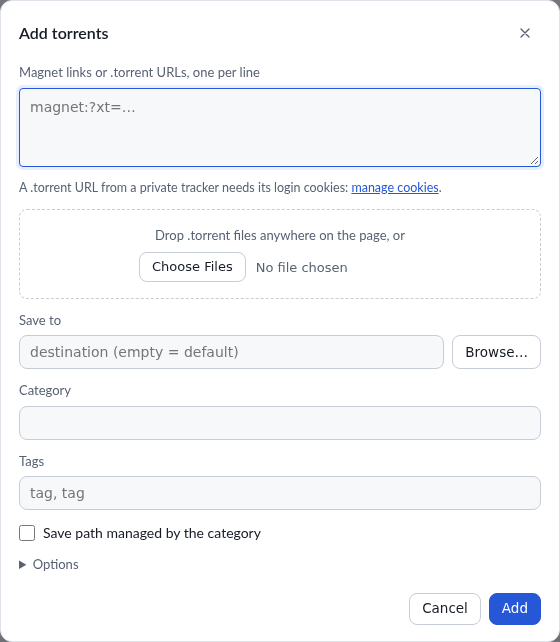
The add dialog takes several magnets or URLs at once; dropping a .torrent
anywhere on the page opens it already filled in. When you choose a .torrent
with the button, the dialog lists the files it contains with a checkbox each:
uncheck what you do not want, and only the checked files are downloaded. A
magnet has no file list until its metadata arrives; add it with paused and
stop at metadata, then choose the files from the Files tab.
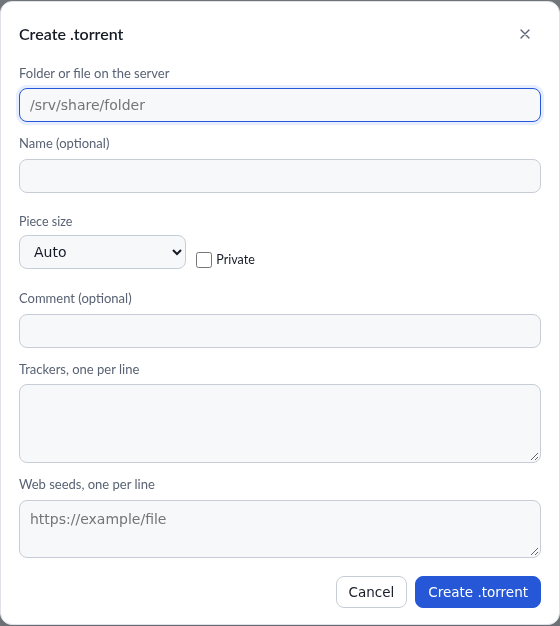
From Tools → Create .torrent you build a torrent from a file or folder on
the server, with piece size, format (v1, read by every client; v2, BEP 52;
hybrid, which serves both swarms), private flag, comment, a source string,
trackers and web seeds. Start seeding after creating adds the new torrent
to the session and seeds the folder or file at once, instead of downloading
the .torrent.
4. Series & movies: what is really missing¶
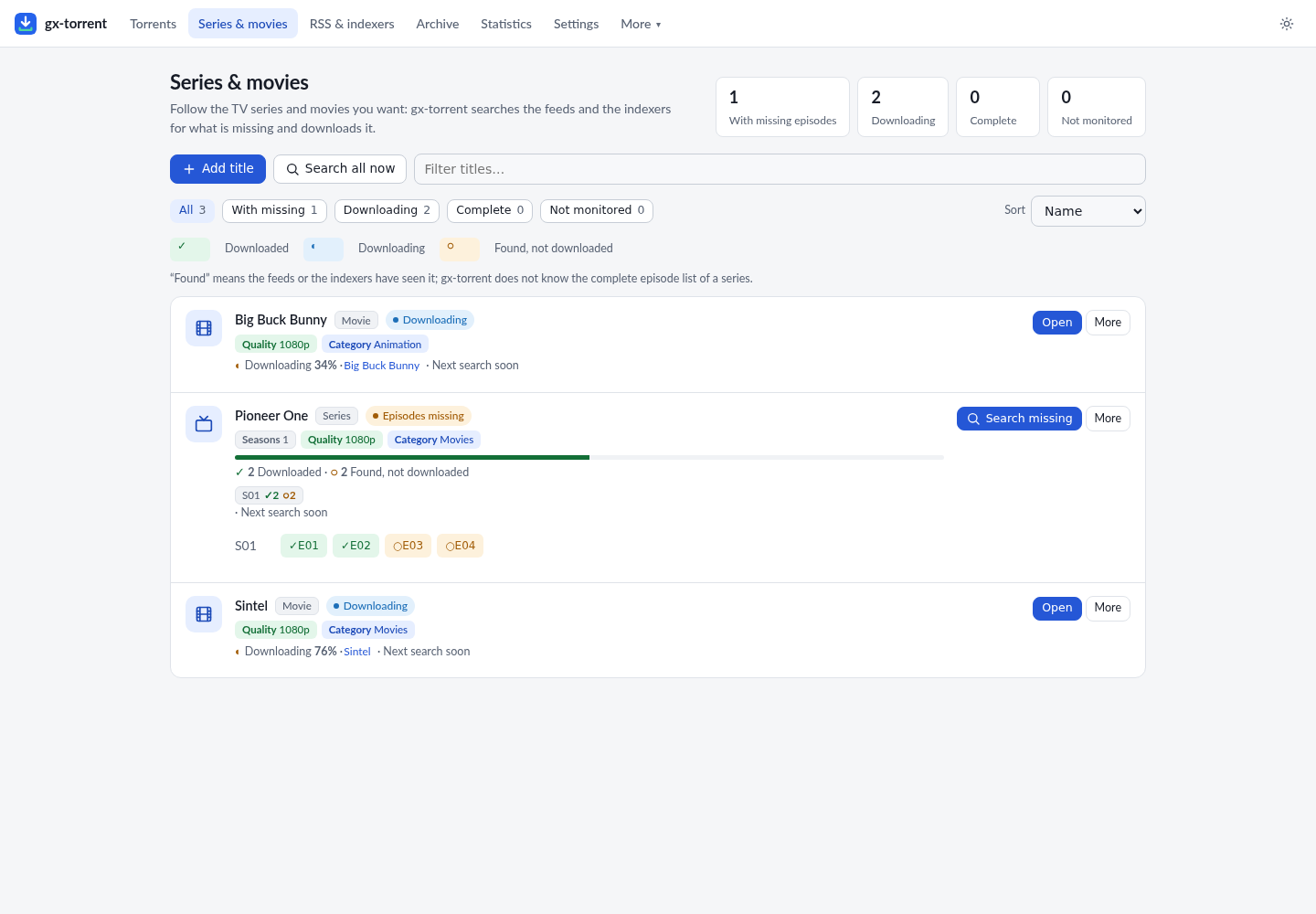
Series & movies turns the client into an acquisition tool. Every title says in words what you have: Downloaded, Downloading, Found, not downloaded. The progress bar is over the episodes found so far; enable the real episode list and the denominator becomes the actual series.
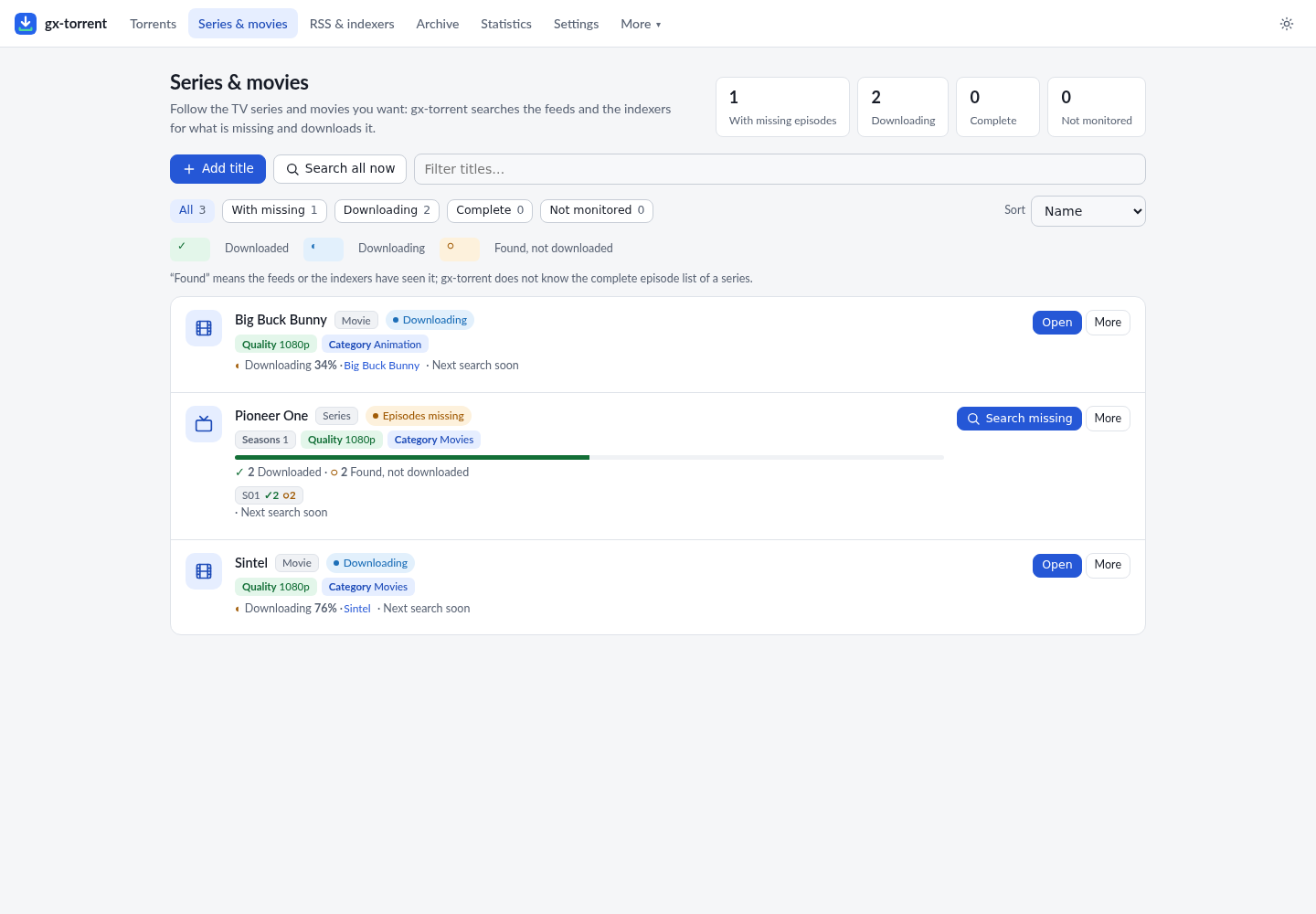
- State filters: all, with missing, downloading, complete, not monitored.
- One primary action per row; everything else is in the More menu.
- Why not? opens the releases found and each verdict.
- Episodes opens the per-season grid with the state of every episode.
- Search, in the Add title dialog, lists under every name the episodes already in the archive with their resolution and language: picking one fills the title and the language from that release.
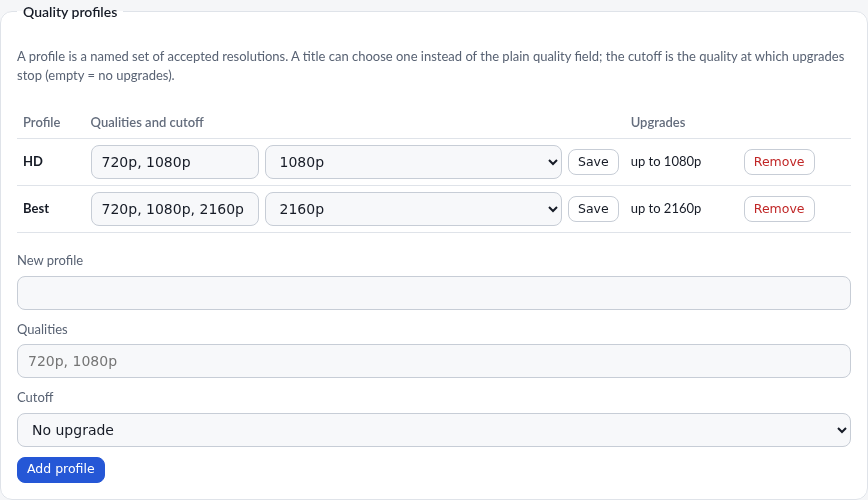
- A title's quality is chosen only through the profile: the dialog has a single Quality profile field and, below it, a Create or edit profiles link that opens the Library tab of the settings. Without a profile the title accepts any resolution.
Quality profiles and upgrades¶
In Settings → Library → Quality profiles you create a profile with the accepted resolutions (360p…2160p) and a cutoff; it is the only way to set a title's quality. With a cutoff, an episode already downloaded at 720p is replaced by a 1080p release when it appears: the new torrent enters, the old one leaves the session and the files stay.
Real episode list (optional)¶
In Settings → Series and movies you can enable TVmaze: the series title
is sent to api.tvmaze.com and gx-core knows the episodes that already aired,
even if no release ever passed through the feeds. It is off by default; without
a match the page keeps using what the feeds and indexers saw and says so on the
row.
5. RSS, archive and search¶
RSS & indexers manages feeds, ordered PASS/FAIL rules, Torznab indexers and the local archive. An indexer can be checked with Test already in the window where you add or edit it, before saving. Rules have a live preview, feed tests, import/export and actions (folder, category, tags, pause, sequential, first/last, top). Archive makes everything the feeds returned searchable, even when it was not downloaded. Search queries the indexers in parallel and shows size, seeds, peers, age and indexer; each result is added at once or with the options (destination, category, tags).
6. Statistics and settings¶
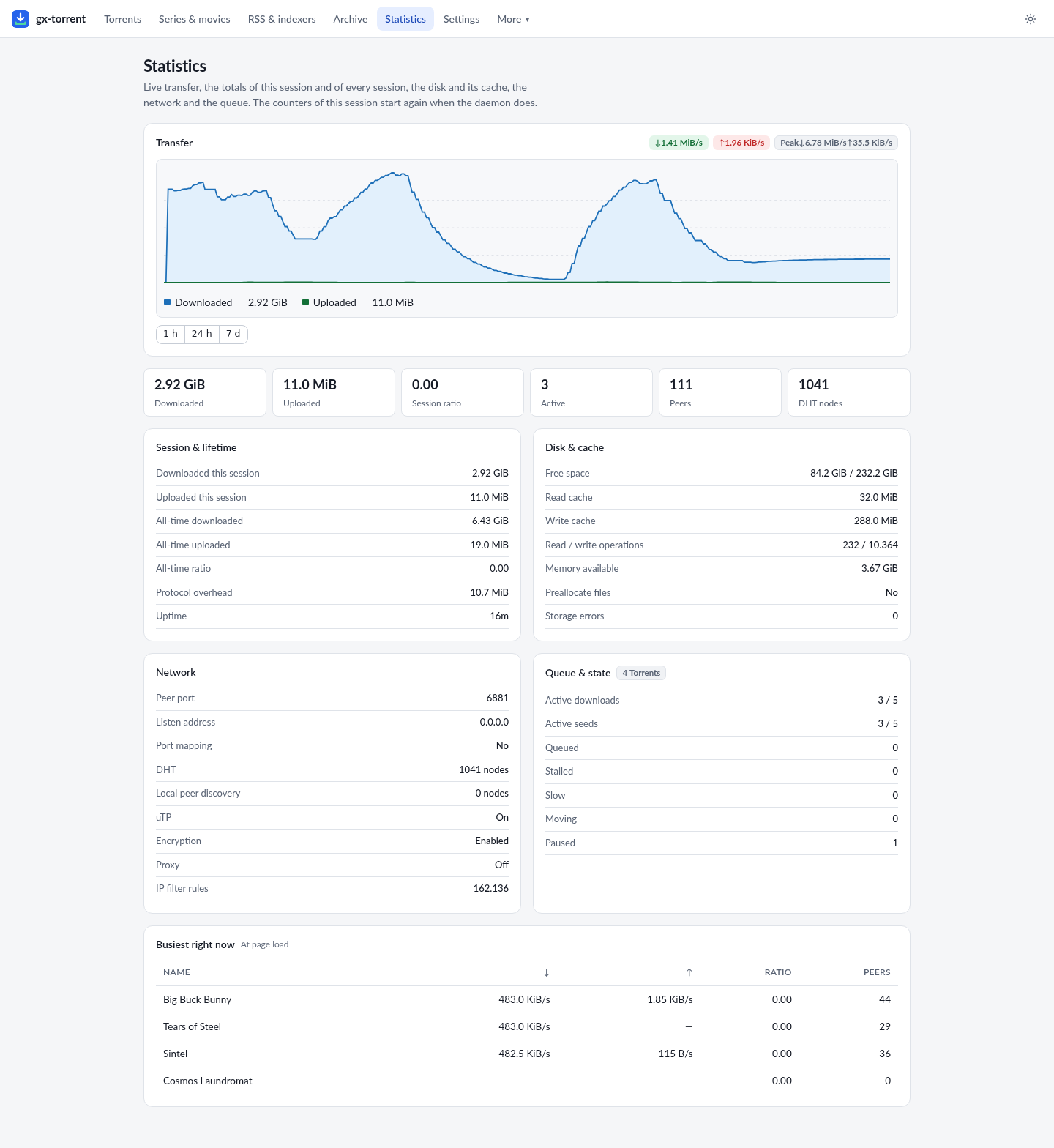
Statistics shows the 1 h / 24 h / 7 d graph, session and all-time totals, disk and cache, network, queue and the busiest torrents.
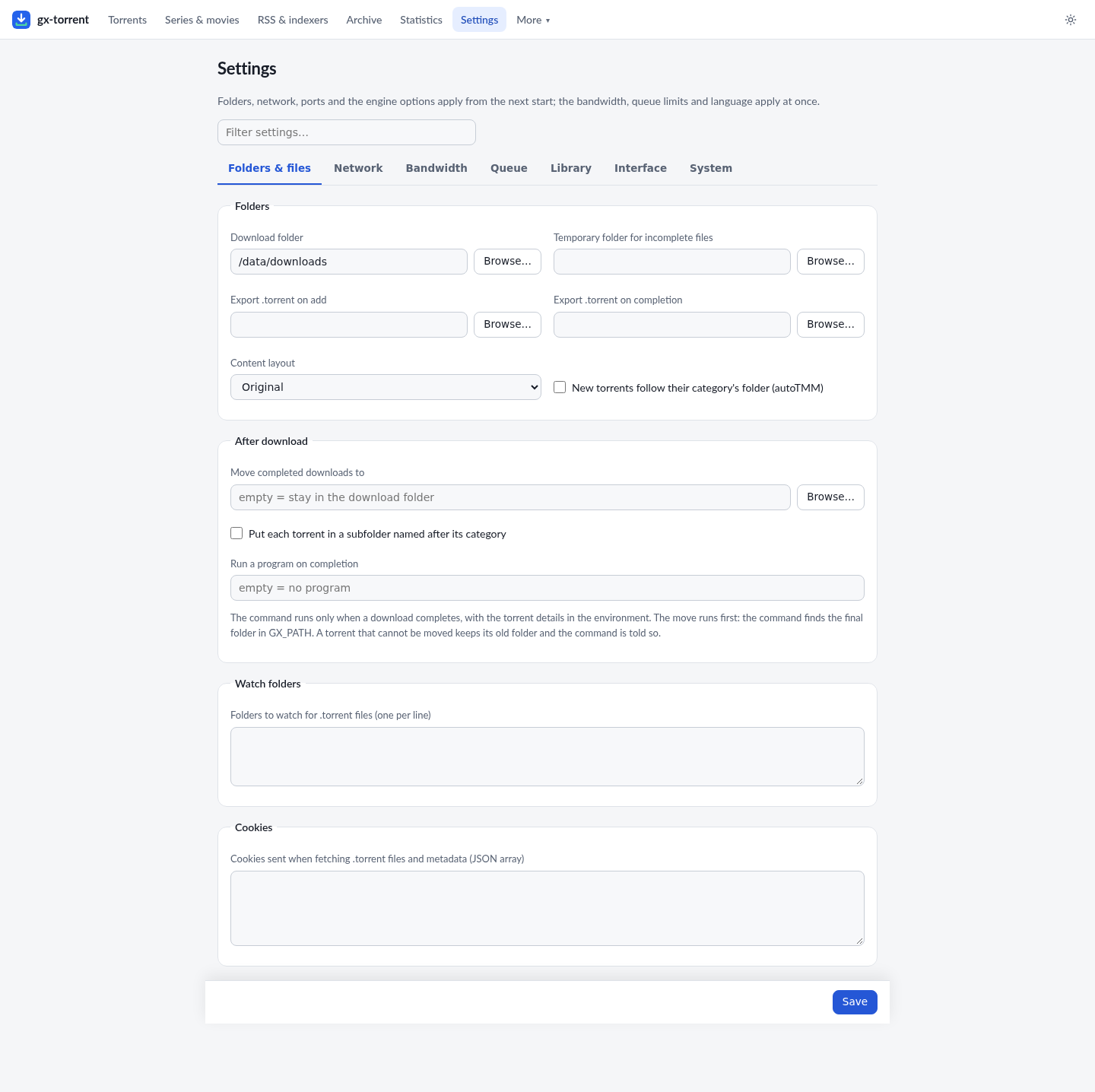
Settings is split into seven tabs — Folders & files, Network, Bandwidth, Queue, Library, Interface and System — so each group of options opens on its own instead of a single long scroll: folders and completion actions, network and protocols, speed limits and the per-day scheduler, queue and cache, categories and quality profiles with DLNA, language and notifications, maintenance and updates. The search box at the top still looks in every tab at once; Save stays at the bottom and saves the whole page, including the groups of the tabs that are closed. After a save or an action inside a tab (adding a category, saving a profile, testing the port, sending a test notification) the page stays on that tab and confirms with a message in the bottom-right corner, so the button visibly did something.
A few options are the native counterpart of qBittorrent's: Recheck data when a
download completes (Queue) verifies the files once before seeding them;
Anonymous mode (Network) hides the client version from peers and public
trackers, without hiding your IP address; Announce to all trackers in a tier
(Network, on by default) asks every tracker of a multi-tracker tier at once;
and Interface → Language lists any language pack you put in <data>/lang
beside the six built-in languages.
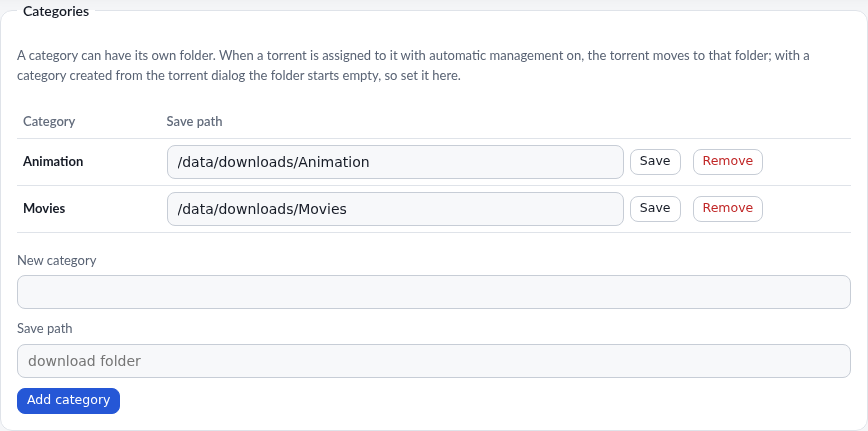
Category management and its path are on the same page: that is what makes automatic torrent management really work.
Automatic speed (measures the line)¶
In Settings → Bandwidth → Automatic speed (measures the line) you let gx-torrent find the speed instead of fixing it: it probes the round-trip latency towards Google and Cloudflare (or a host you choose) and moves download and upload together, lowering them when the line queues and raising them again when the latency drops. A manual limit stays the ceiling, and the real maximum speeds of the line, if you know them, let it reach the right point sooner; with those maxima at 0 it discovers them by itself. Optimize in the same tab zeros the two limits and turns automatic speed on. It is off by default.
Notifications¶
In Settings → Interface → Notifications the client tells you what happens on
the same channels as Gextto and indexarr: Telegram, a generic webhook
(JSON, Discord, Slack, Gotify, ntfy or Pushover format), Discord, Slack,
Gotify, ntfy, Pushover, an Apprise server, e-mail and a
custom script. Fill in the ones you use and leave the others empty: every
filled channel receives every enabled event, and a slow service does not hold up
the others. Three switches choose the events — Download complete, Feed added
torrents, Feed error — and Send test tries all the saved channels at once.
The script receives the event in the GX_TORRENT_* variables (app, event, title
and message), never on the command line.
7. What it costs in CPU and RAM¶
Engine, queue, web page, RSS and the qBittorrent-compatible API are one pure-Go process: no external engine, no C library, no database server. These figures are the whole daemon, measured on an Intel N97 mini-PC (4 cores, 16 GB RAM), with DHT on and a full IP filter loaded (172,740 rules); the at-rest row is the sample of 6 November 2026, the others are from 26–30 October 2026:
| Situation | CPU | Memory (RSS) |
|---|---|---|
| At rest | 0.3–0.5 % of one core | 28–30 MB |
| Downloading from public swarms at 8.2–8.8 MB/s with 116–132 peers | 18–37 % of one core, 2.0–4.3 s of CPU per 100 MB | — |
| Loopback transfer (seed and leecher on the same host) | 7.5–8.3 s of CPU per 1.09 GiB for both sides | ≈ 100 MB peak |
| Five minutes after a burst, with no transfer | — | 550 MB → 35–40 MB |
At rest the CPU is mostly real network work — the DHT and incoming peer
handshakes — not internal polling. The connection cap is sized from the machine
(55 peers per torrent and 300 in total on this 4-core host), and the buffers of
the pieces return after a burst instead of staying reserved. Machine, date and
the command for every figure are in
measurements.md.
8. From the phone¶
The page is responsive and installable as an app: the manifest and the service worker cache only the shared assets, never an authenticated page or an API answer. When a password is set, Sign out appears.
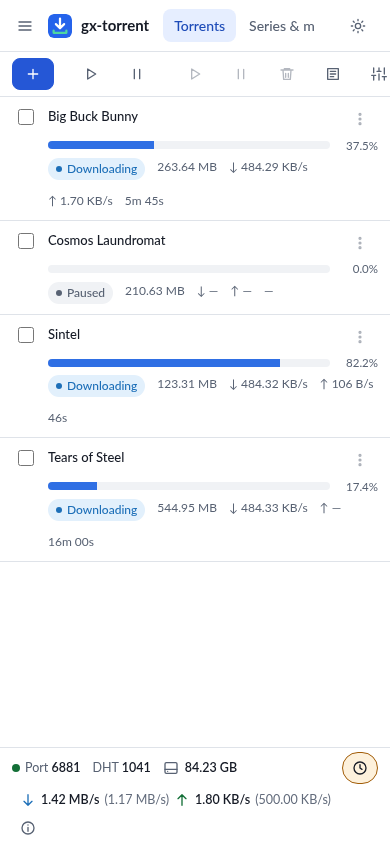
On a phone every torrent is a card (name, bar, state and speeds) and the archive is a card per item, with the title, the size, the seeds and the Add, Copy magnet and delete buttons; the section bar scrolls sideways and brings the page you are on into view. In the detail the file names stay readable and the table scrolls sideways.
9. Integrations¶
gx-core exposes the qBittorrent-compatible API (/api/v2) for Sonarr,
Radarr, Lidarr, Readarr, Prowlarr and mobile apps. In Settings → Network you
set the API key (X-Api-Key or Bearer) and the version reported by
app/version (default 4.6.7). The native /api/v1, Prometheus and SSE remain
available for scripts and automations. A feed keeps its identifier when you
rename it, move it or give it a new address, rules report their last match and
the episodes already taken, and the tags set by a client stay: apps that read
these fields find them filled. Compatibility is broad but not a 100% clone: the
limits are in gx-core.md §6.
10. Security¶
- The page listens on
0.0.0.0:8080in the container; login is optional but recommended if you expose it beyond the LAN. - CSRF, DNS rebinding and “what counts as LAN” are handled server-side; trusted proxies must be declared.
- The API key and token are secrets: keep them out of public URLs.
- Web seeds and magnet sources cannot reach the local network unless you allow it.
11. Reproducing this manual’s environment¶
The images come from a gx-torrent container with four public, legal torrents,
a couple of categories and one followed title. The steps are those of chapter
1; torrents are added from Add or the API:
curl -X POST --data-urlencode \
  'urls=https://webtorrent.io/torrents/big-buck-bunny.torrent' \
  http://127.0.0.1:8080/api/v2/torrents/add
No personal data, no private trackers, no copyrighted content.
12. Supporting the project¶
gx-torrent is free and has no advertising. If it is useful to you, the Donate button is always in the bottom-right corner of the interface pages: it opens PayPal in a new tab and the donation goes to development. On a phone the button keeps only the heart. The same link is in the README.